Minesweeper looks like pure luck the first time you play it, but most of the board can be worked out with a handful of rules. This guide covers how to play Minesweeper with the Classic Minesweeper game free on Gipcus, and it also explains what makes this version different from the Windows game you may remember. The boards are smaller and packed with far more mines, and one hidden rule changes how you should play. We confirmed each mechanic below by reading the game’s own code and running its board logic, so nothing here is guesswork. Open the game in another tab and try each step as you read.
Quick answer: Click near the centre to start (your first click is never a mine). When you open a safe square yourself, the game also opens every safe square touching it. That means any unopened square still touching a number you clicked is a mine, so flag it. After that, use the 1-1-X, 1-2-X, 1-2-1 and 1-2-2-1 patterns and quick-click numbers to chord. You win as soon as every safe square is open.
How Minesweeper works in 30 seconds
- The board is a grid of covered squares. Some hide mines.
- Open a square. If it is a mine, the round ends. If it is safe, it shows a number: how many mines touch it, counting all eight neighbours (sides and diagonals).
- A blank square has no mines next to it. The game opens the area around it automatically.
- Flag squares you know are mines so you don’t click them by accident.
- You win by opening every square that isn’t a mine.
Board sizes: why this Minesweeper feels harder than Windows
The game has three difficulties: Beginner, Intermediate and Expert. It uses the classic difficulty names, but the boards are much denser than the Windows standard. The table compares the values set in this game’s code with the usual Beginner, Intermediate and Expert presets listed by Authoritative Minesweeper and Wikipedia.
| Difficulty | Gipcus board (rows × columns) | Mines | Squares that are mines | Usual Windows preset | Windows mine share |
|---|---|---|---|---|---|
| Beginner | 9 × 9 (81 squares) | 20 | 24.7% (about 1 in 4) | 9 × 9, 10 mines | 12.3% |
| Intermediate | 12 × 10 (120 squares) | 40 | 33.3% (1 in 3) | 16 × 16, 40 mines | 15.6% |
| Expert | 14 × 12 (168 squares) | 80 | 47.6% (almost 1 in 2) | 16 × 30, 99 mines | 20.6% |
So Beginner here has double the usual mine density, and Expert has more than double. Expert leaves only 88 safe squares among 80 mines. There is no custom board option, so these three presets are the only choices. Dense boards produce more 3s, 4s and 5s, and you will have to guess more often than in Windows Minesweeper. That makes the hidden rule in the next section even more important.
Controls on desktop and mobile
| Action | Desktop (mouse) | Phone or tablet |
|---|---|---|
| Open a square | Quick left-click | Quick tap |
| Flag or unflag a square | Right-click, or hold left-click for more than half a second | Long-press (more than half a second) |
| Chord (open all remaining neighbours of a number) | Quick click (under about a quarter of a second) on an opened number whose flags match it | Quick tap on that number |
| Restart the same difficulty | Click or tap the face button at the top. It works at any time, not only after a round ends | |
| Pause | Use the menu button in the top bar. The timer stops while the game is paused | |
Good to know:
- Flags toggle on and off. There is no question-mark state. Click once to flag and again to remove the flag.
- Flagged squares are locked. Clicking a flagged square won’t open it, so a flag also protects you from a misclick.
- Slow clicks become flags. If you hold the button longer than half a second on a covered square, the game places a flag instead of opening it. Click crisply.
- The mine counter is mines minus flags. It can go negative. If it shows a minus number, at least one flag is wrong.
- The timer starts on your first click. Your best winning time for each difficulty is saved in your browser’s local storage. Losses don’t count. Clearing site data or switching device resets it.
- The game is built for portrait screens. On a phone, hold it upright. In landscape the game asks you to rotate your device.
The hidden rule: opening a safe square also opens its safe neighbours
This is the most useful thing to know about this version. The game is built on the open-source Minesweeper library by Luke Howard. In this library, when you open a safe square yourself, it opens every safe, unflagged square touching it, even when the square you clicked shows a number. In Windows Minesweeper, a number only opens itself. Any neighbour that turns out to be blank keeps spreading as usual.
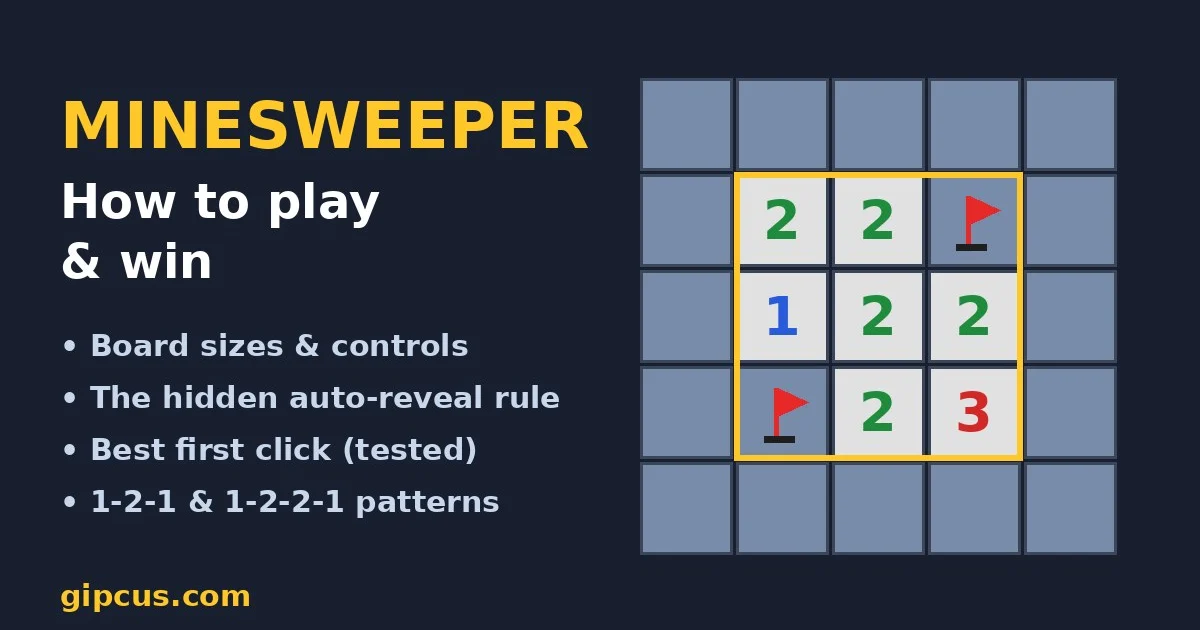
We ran the game’s own board code on a test grid to check this. Below is the 3 × 3 area around a square that showed a 2 after we clicked it:
| Left | Middle | Right | |
|---|---|---|---|
| Top | 2 | 2 | covered |
| Middle | 1 | 2 (clicked) | 2 |
| Bottom | covered | 2 | 3 |
Six of the eight neighbours opened automatically, and exactly two stayed covered. The clicked square says 2, so both covered squares are mines. That is always the case. After you open a square, every unflagged square still covered next to it is a mine.
How to use it:
- Open a square you believe is safe.
- Look at the eight squares around it. Every covered, unflagged one is a mine. Flag them straight away.
- Those new flags often complete nearby numbers. Quick-click those numbers to chord. Chording opens their other neighbours, and each square it opens reveals its own safe neighbours too.
- Repeat. Each safe click becomes a chain of free information.
Two exceptions:
- The rule applies to squares you open yourself and to blank squares. Numbers that appear at the edge of a blank area did not reveal their own neighbours, so the rule doesn’t apply to them. Use normal logic there.
- If you put a flag next to a square before opening it, that flagged square is skipped. It could be safe, so the rule only applies to unflagged squares.
Where to click first
Your first click is always safe. When the board is generated, the game re-rolls the mine layout until the square you clicked is not a mine. Unlike modern Windows versions, though, that square is not guaranteed to be blank, so its neighbours can still hide mines.
To find the best opening square, we ran the game’s own board code on 5,000 random boards for each starting position (our simulation, not an official figure):
| Difficulty | Start square | Chance the first square is blank | Average squares opened by the first click |
|---|---|---|---|
| Beginner | Corner | 42.6% | 5.9 |
| Middle of an edge | 23.7% | 8.4 | |
| Centre | 8.9% | 11.9 | |
| Intermediate | Corner | 28.8% | 4.0 |
| Middle of an edge | 12.2% | 5.6 | |
| Centre | 3.2% | 7.9 | |
| Expert | Corner | 13.8% | 2.8 |
| Middle of an edge | 3.7% | 3.9 | |
| Centre | 0.5% | 5.3 |
Start in the centre. A corner is the most likely square to be blank, but a centre square has eight neighbours and the game opens all the safe ones, so on average the centre opens the most squares on every difficulty. After the first click, flag every covered square touching it, then start solving.
The patterns that solve most of the board
These are standard Minesweeper patterns, explained in detail on Authoritative Minesweeper’s patterns page. They work the same way here. Each one describes a row of numbers along a straight edge of covered squares.
| Pattern | What it tells you | Why |
|---|---|---|
| 1-2-X | The third covered square, past the 2, is a mine. | The 2 touches three squares and has two mines. The 1 shares two of those squares and allows only one mine there, so the third square must hold the other mine. |
| 1-1-X (starting from a wall) | The third square from the wall is safe. | The first 1 limits its mine to two squares. The second 1 shares those two squares, so its third square must be empty. |
| 1-2-1 | Mines sit under both 1s. The square under the 2 is safe. | Apply 1-2-X from the left and then from the right. |
| 1-2-2-1 | Mines sit under both 2s. The squares under the 1s are safe. | Apply 1-2-X from both ends. |
| Reduction | Subtract flagged mines from each number, then look for the patterns above again. | A 3 touching one flag works like a 2. A 4 touching three flags works like a 1. |
Reduction is the pattern you’ll use most on the denser Gipcus boards, because big numbers are common. Flag every certain mine first, then read each number as “number minus flags around it”. Many 3-4-3 walls turn into simple 1-2-1s.
A game plan for each difficulty
Beginner (9 × 9, 20 mines)
- Click the centre square. Flag any covered squares touching it.
- Chord every number whose flags now match it. Keep working outward with the patterns above.
- One in four squares is a mine, so expect some guesses. When you must guess, choose a square next to a low number with many covered neighbours. For example, a 1 with four covered neighbours gives each one roughly a 1-in-4 chance of being a mine. That is a rough estimate, because neighbouring numbers change the odds.
Intermediate (12 × 10, 40 mines)
- Start in the centre again. The first click opens about 8 squares on average.
- Expect to flag several mines straight away. One in three squares is a mine, so 2s and 3s are common.
- Use reduction constantly. Solve one edge completely before moving to another, because half-solved edges are where misclicks happen.
Expert (14 × 12, 80 mines)
- Nearly half the board is mines, and only 88 squares are safe. Wins take some luck, so play for clean logic and accept guesses.
- Use the mine counter late in the game. The counter divided by the number of covered squares gives a rough average chance that a covered square is a mine. If a square next to a number has better odds than that average, guess there. If not, a square away from the numbers may be the better bet.
- Your best guess is a square that will tell you the most. A square that touches many covered squares makes the game open all of its safe neighbours if it is safe, and this often unlocks a whole section.
Common mistakes
- Chording with a wrong flag. A chord trusts your flags. If one is wrong, the chord opens a mine and the round ends. Only flag squares you have proved.
- Holding the click too long. More than half a second on a covered square places a flag. It’s harmless, but it costs time and throws off the counter.
- Applying the hidden rule to the edge of a blank area. The rule only works around squares you clicked (and around blanks). For numbers at the edge of a blank area, use the patterns.
- Thinking you must flag everything. You don’t. The round ends in a win as soon as every safe square is open.
Frequently asked questions
Is Classic Minesweeper free on Gipcus?
Yes. Classic Minesweeper runs free in your browser. You don’t need to download anything or create an account.
Is the first click always safe?
Yes. The game keeps re-rolling the mine layout until the first square you click is safe. That square isn’t guaranteed to be blank, though, so mines can sit right next to it.
Why are there so many mines compared with Windows Minesweeper?
This version uses smaller boards with more mines: 20 on 9 × 9, 40 on 12 × 10 and 80 on 14 × 12. That is roughly double the mine density of the standard Windows presets on every level.
How do I flag a mine on a phone?
Long-press the square for more than half a second. Long-press again to remove the flag.
What is chording, and does it work here?
Chording opens all remaining neighbours of a number at once. In this game, quick-click (or tap) an opened number when the flags around it match the number. If the flags don’t match, nothing opens.
Can I play a custom board size?
No. This version has only Beginner, Intermediate and Expert, with the fixed sizes in the table above.
Does the game save my best time?
Yes, for each difficulty, but only for wins. It is stored in your browser, so it won’t carry over to another device or survive clearing site data.
More logic puzzles on Gipcus
- How to solve nonograms, another no-guess logic grid, playable in Nonogram Master.
- 2048 tips and strategy for a different kind of grid puzzle.
- Brain Test answers for every level when you want trick puzzles instead.
- Quiet browser games for a work break and 5-minute games for a lunch break. A Beginner round of Minesweeper fits easily into either.