
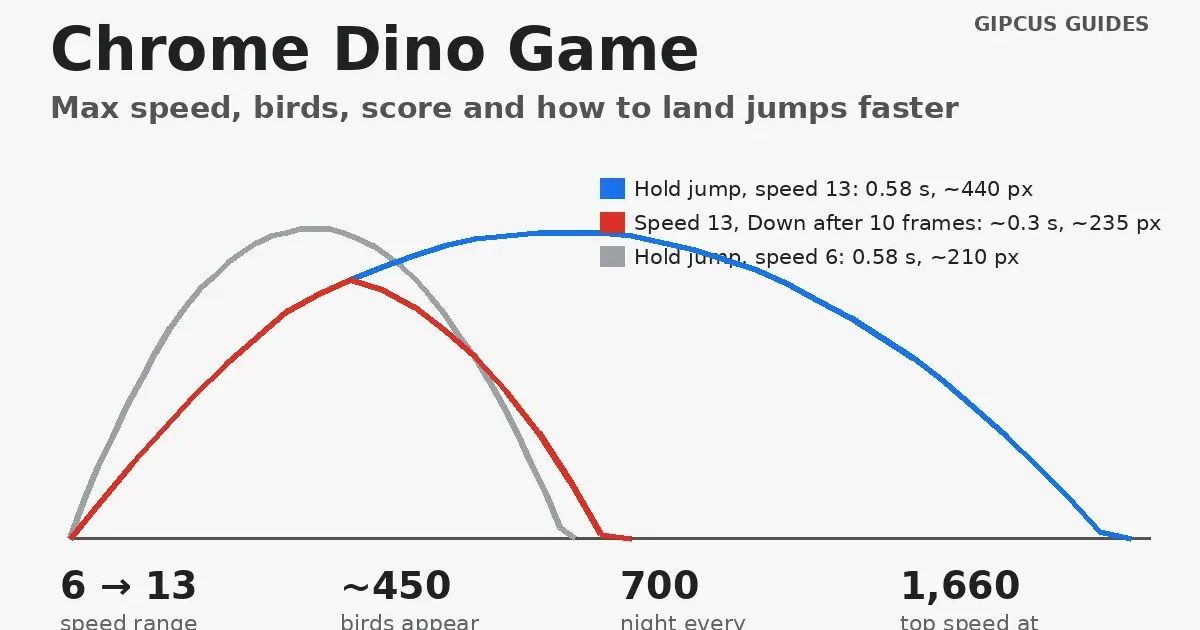
Quick answer: The Chrome Dino game starts at speed 6 and speeds up every frame until it caps at 13, which you reach at about 1,660 points (two minutes). Pterodactyls appear from about 450 points, the screen flips to night every 700 points, and the score keeps counting past 99,999. Press Down mid-air to land fast.
By Ashish Sharma · Updated November 8, 2026 · How we tested: we read the T-Rex game’s current source code in the open-source Chromium project (the dino_game folder) and ran its jump code frame by frame in a simulation at 60 fps. The speeds, bird heights and jump timings below come from that code.
In Short
- Controls: Space or Up to jump, Down to duck, Enter to restart.
- Top speed: 13, reached at about 1,660 points. Nothing new appears after that.
- Birds: from about 450 points, at three heights on desktop.
- Our tested tip: pressing Down in the air cuts a jump from about 0.58 s to about 0.3 s.
The T-Rex runner is the little game Chrome shows when you lose your internet connection. Most pages about it repeat the same few tips. This one explains how the game actually works, so you know what’s coming and why your runs end. If you like quick browser games, our 5-minute browser games list has more.
How do you play the Chrome Dino game?
Type chrome://dino in Chrome’s address bar and press Space. It also appears on Chrome’s “No internet” page. You don’t need to be offline to use the address.
| Action | PC | Phone |
|---|---|---|
| Start / jump | Space or Up arrow | Tap the screen |
| Duck / fast fall | Hold Down arrow | Not available |
| Restart after a crash | Enter, Space, Up, or click | Tap |
| Pause | Switch tabs or click away | Switch apps |
The code also listens for a connected gamepad, so a controller can work too.
How fast does the Dino game get, and is there a max speed?
Yes. Speed starts at 6 and stops at 13. The game adds 0.001 to the speed every frame. Your score is the distance run in pixels multiplied by 0.025, so on a 60 Hz desktop screen a perfect run looks like this:
| Score (approx.) | Time | What happens |
|---|---|---|
| 0 | 0 s | Speed 6. Obstacles start after 3 seconds. |
| Every 100 | Every few seconds | The score flashes and chimes. |
| About 450 | About 42 s | Speed 8.5. Pterodactyls can now spawn. |
| 700, 1,400, 2,100… | From about 1 min | Night mode: colours invert for 12 seconds. |
| About 1,660 | About 1 min 57 s | Top speed 13. The game stops getting faster. |
| 99,999 | About 86 min | The counter adds a sixth digit and keeps going. |
These numbers are our maths from the code’s constants. A 120 Hz screen speeds up twice as fast per second, because the speed rises per frame, so the cap arrives sooner and at a lower score.
When do birds appear, and how do you dodge them?
From speed 8.5, about 450 points, and they fly at three heights on desktop. Some birds also fly a little faster or slower than the ground.
| Bird height | What to do |
|---|---|
| Low (near the ground) | Jump. Ducking won’t clear it. |
| Middle | Duck (hold Down) or jump. |
| High | Keep running. It passes over your head. |
We checked these against the game’s hitboxes: a ducking T-Rex is only 25 pixels tall, which clears the middle bird but not the low one. On phones the middle height is removed, so you only see low and high birds.
How long is a jump, and how do you land faster?
A full jump lasts about 0.58 seconds, and pressing Down mid-air cuts that roughly in half. This is the one trick that saves the most runs: when a bird or cactus follows straight after another, you don’t want to still be in the air.
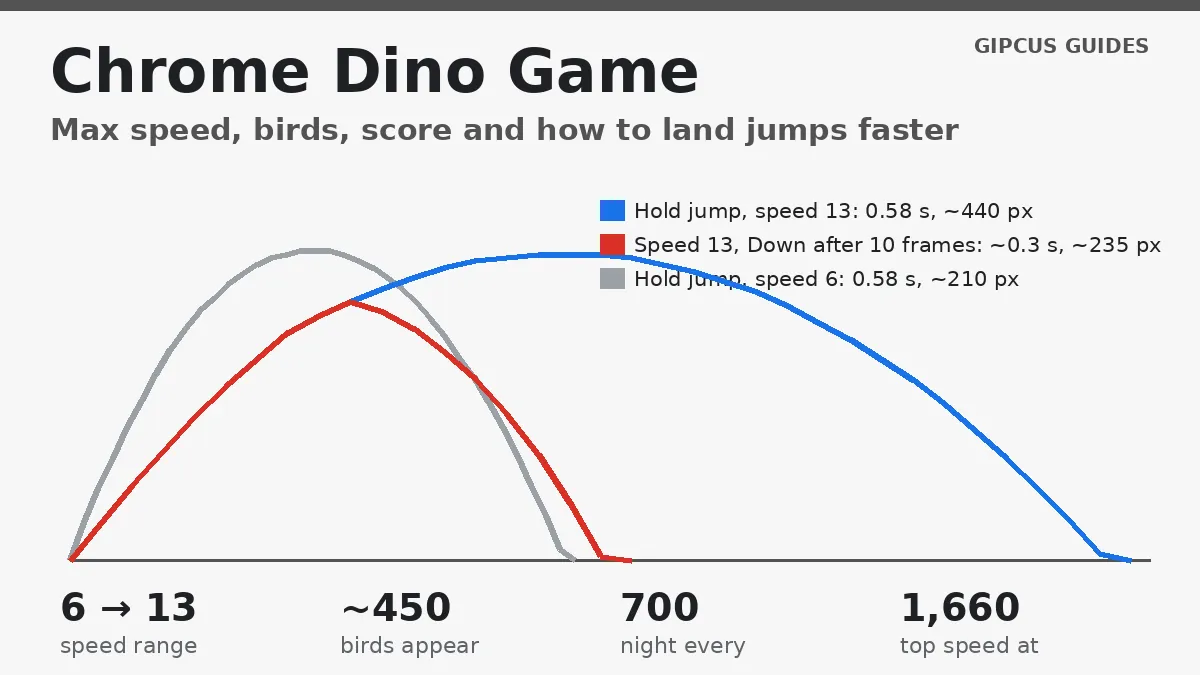
| Jump type | Air time | Distance at speed 6 | Distance at speed 13 |
|---|---|---|---|
| Hold the jump key | 35 frames (about 0.58 s) | About 210 px | About 440 px |
| Quick tap (released after about 0.1 s) | 32 frames (about 0.53 s) | About 190 px | About 415 px |
| Hold, then press Down after 10 frames | 17 to 18 frames (about 0.3 s) | About 100 px | About 235 px |
Two things surprised us. First, a quick tap only shortens a jump a little, because the game always lifts you to a minimum height before it lets you cut the jump. Second, the T-Rex covers more than twice the ground per jump at top speed, so late in a run you should jump a bit later than feels natural.
What happens at 99,999 points, and does the game end?
No, it doesn’t end. The counter starts with five digits. When your score goes past 99,999, the code adds a sixth digit and the run continues. The only thing that ends a run is hitting a cactus or a bird. At top speed you earn about 19.5 points a second, so 99,999 takes roughly an hour and a half without a single mistake.
Your best score shows as HI next to the current score. The very top scores you see in videos are often made with bots or edited code, since a few lines of JavaScript can make the T-Rex jump on its own.
How do you get a higher score in the Dino game?
- Play on a computer. Keys react faster than taps, and a wide window shows obstacles earlier.
- Use Down in the air. Tap Down as soon as you’ve cleared an obstacle to get back on the ground.
- Jump later at high speed. Your jump gets longer as the game speeds up, so wait a beat.
- Ignore high birds. Jumping at a high bird wastes time and can land you on the next cactus.
- Expect night mode. Every 700 points the colours flip for 12 seconds. The obstacles don’t change, so don’t panic.
- Stay on the tab. Clicking away pauses the game, but coming back starts it again straight away, so be ready.
Play similar free on Gipcus
Want more one-button reflex games? These run in your browser with no download:
- Flappy Copter: tap to stay in the air and thread the gaps.
- Parkour Block 3: jump across blocky parkour courses.
- Hurdle Track Car Stunts: time your jumps over track obstacles.
More guides in the same vein: how to win Google Snake and Google Pac-Man levels and 2 player.
FAQ
How fast does the Chrome Dino game get?
It starts at speed 6 and adds 0.001 every frame until it hits the cap of 13. On a 60 Hz screen that takes about 117 seconds, at roughly 1,660 points. After that the game never gets faster.
When do birds appear in the Chrome Dino game?
Pterodactyls can only spawn once the speed reaches 8.5, which is about 450 points or 42 seconds into a run on a 60 Hz desktop screen. Before that you only see cacti.
Is 99,999 the max score in the Dino game?
No. When the score passes 99,999 the counter adds a sixth digit and keeps going. There is no end screen; a run only ends when you hit an obstacle.
How do you duck in the Chrome Dino game?
Hold the Down arrow. Ducking lets you pass under middle-height birds. Pressing Down in mid-air also makes the T-Rex fall about three times faster.
Can you pause the Chrome Dino game?
There is no pause key. The game stops by itself when you switch tabs or click outside the window, and carries on when you come back.
How do you restart the Dino game?
Press Enter, Space or the Up arrow, or click the restart icon. Space and Up only work after a short delay so you don’t restart by accident.
Why is the Dino game slower on my phone?
On narrow screens Chrome scales the starting speed to the screen width, so phones start slower than 6. Phones also only get low and high birds, not the middle height.
Source: the Chromium project’s open-source dino_game code (offline.ts, trex.ts, obstacle.ts, distance_meter.ts), read November 8, 2026. Chrome may change the game in future versions; we’ll update this page if it does.