










About Classic Minesweeper
- Genre
- Mind Games, Puzzle
- Platform
- Desktop & mobile
- Price
- Free
- Updated
Classic Minesweeper is a free online Minesweeper game, the browser version of the legendary logic puzzle — clear the minefield without detonating a single bomb. Play instantly on Gipcus with no download and no account. This version recreates the Windows XP-era board, with Beginner, Intermediate and Expert difficulty levels.
How to play Minesweeper online
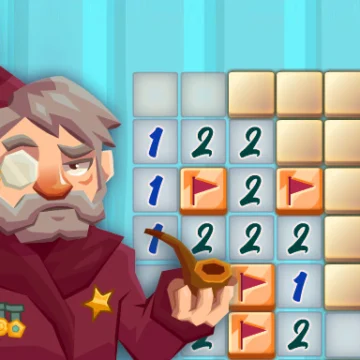
- Click (or tap) a square to reveal what is underneath.
- A number shows how many mines sit in the eight surrounding squares.
- Right-click (or long-press) to plant a flag on a square you think hides a mine.
- Use the numbers as clues to deduce safe squares and flagged mines.
- Clear every non-mine square to win. Hit a mine and the round ends.
Tips to clear the board faster
- Start near the center or edges to open large empty regions quickly.
- When a number matches the count of flagged neighbors, every other neighbor is safe — open them.
- When a number matches all remaining unopened neighbors, flag them all.
- If two possibilities look equal, mark uncertainty and come back after opening nearby clues.
Frequently asked questions
Is Minesweeper free on Gipcus?
Yes. Classic Minesweeper runs free in your browser on phone, tablet, or desktop — no install.
Can I play Minesweeper on mobile?
It loads in mobile browsers, but this classic version is built for a mouse: left-click to open squares, right-click to flag. For the smoothest play, use a desktop or laptop.
What do the numbers mean in Minesweeper?
Each number is the count of mines in the eight squares touching that cell. Use that to reason which neighbors are safe or dangerous.
What difficulty levels does Classic Minesweeper have?
Three: Beginner, Intermediate and Expert, recreating the Windows XP-era board.
How do I win?
Reveal every square that is not a mine. Flagging all mines helps, but the win condition is clearing the safe cells.
Ready for a quick logic challenge? Play Classic Minesweeper online free on Gipcus whenever you want a short, brainy break.