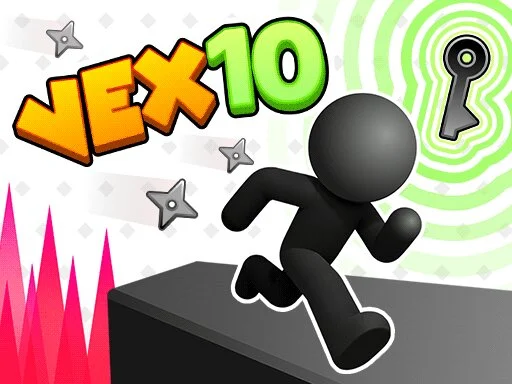
Want to play Vex 10 online free with no download? Open the browser platformer on Gipcus, dash through deadly traps, and clear each act’s checkpoint gauntlet—desktop or phone—in one click.
This guide covers how Vex 10 works, controls, movement tech that saves retries, stage habits that cut fail streaks, and a short FAQ so you stop bouncing off the same spike pit.
What is Vex 10?
Vex 10 is a free browser stickman platformer in the long-running Vex series: run, jump and crouch through trap-filled Acts with spikes, lasers and tricky gaps. Deaths are fast and the retry is instant, so it stays fair enough for “one more try.” Vex 10 is from Azerion Casual Games and is distributed via GameDistribution.
Play instantly on gipcus.com/game/vex-10/—no installer required.
How to play Vex 10 online (controls)
- Open Vex 10 on Gipcus and hit play.
- Move, jump and crouch with the arrow keys or W, A, S, D.
- Crouch under low hazards when the level demands it.
- Stop before each new hazard and watch its pattern before you commit.
- After a fail, retry straight away and learn the segment until you clear the stage.
| Action | Keyboard | Phone or tablet |
|---|---|---|
| Move | Left/Right arrow or A/D | On-screen run buttons |
| Jump | Up arrow or W | Jump button (short taps) |
| Crouch / slide | Down arrow or S | Slide button |
On mobile, use the on-screen buttons and keep taps short so you do not overjump.
What is new in Vex 10
Vex 10 adds brand-new Acts and mechanics the older games didn’t have:
- Upside-down gravity: some sections let you walk on ceilings. Jump only when the flip lines up with a safe landing.
- Character switching: swap between characters to get past certain rooms.
- Rotating platforms: the floor turns under you, so wait for it to settle before you run.
- Invisible booby traps: hidden hazards appear without warning. Move slowly through new rooms.
- Freeze time: stop time to get safely past some obstacles.
- Challenge Mode: a separate mode where you control several Vex characters at once. Learn the normal path first.
Movement tips that cut retries
- Walk the room once with your eyes. Spot the kill timing (saw cycles, laser pulses) before you sprint.
- Short hops beat full jumps in tight ceilings—overjump is the #1 self-kill.
- Slide early, not late under low beams; late slides clip the hazard and send you back.
- Reset clean. After a fail, take one breath and replay the segment slowly once, then speed up.
Stage habits for longer clear streaks
- Treat each screen as a pattern, not a panic dash.
- If a section takes more than ~10 fails, change approach (wait a cycle, jump later, or take the safer route).
- Do not skip checkpoints mentally—know the last safe tile so a mistake costs seconds, not the whole act.
- If a jump feels impossible, back up two platforms and rebuild speed.
Related free stickman & skill games on Gipcus
- Stick Merge — merge guns and clear sniper missions
- Stickman Swing — grappling swing runs
- Stickman Death Run — another trap-filled stickman runner
- Original Pac-Man — classic maze chase (Pac-Man guide)
- Snow Rider 3D tips — another quick skill game
- Stick Merge how-to guide
FAQ: Vex 10 online free
Is Vex 10 free to play online?
Yes. Play the browser version on Gipcus Vex 10 without paying to start.
Do I need to download Vex 10?
No download is required for the Gipcus browser version.
Is Vex 10 hard?
It is a precision platformer—expect frequent deaths. Checkpoints and short rooms keep retries quick.
Can I play Vex 10 on mobile?
Yes, in a modern mobile browser via the Gipcus game page; touch controls replace the keyboard.
What is Challenge Mode in Vex 10?
A separate mode where you control multiple Vex characters at the same time. It is built for best times once you know the normal path.
Who made Vex 10?
Azerion Casual Games, distributed via GameDistribution.
Is Vex 10 unblocked?
It runs as an HTML5 game in your browser with no download. Whether it loads on a school or work network depends on that network’s filters.
Ready when you are—clear the first trap room, lock the checkpoint rhythm, and push the next act on Gipcus.